
A connected registrar lets OpusDNS read your domains, DNS zones and contacts at your current provider. You need it for the transfer wizards, the DNS zone import and the registrar portfolio report. It also lets you ask the AI Concierge about your whole portfolio across all providers.
Where to Find It
Path: Left sidebar → AI Concierge → Tools → Connected Registrars
Direct URL: /settings/connected-registrars
Supported registrars
CentralNic, eNom, InterNetX (AutoDNS), Moniker, NIC Direct, Nicmanager, Openprovider, OpenSRS, OpusDNS (additional OpusDNS accounts), PartnerGate and Realtime Register.
Connect a registrar
- Click Add Credential.
- Enter a Name for the connection, for example "InterNetX main account".
- Choose the Registrar. The credential fields adapt to the registrar you choose, for example username and password, user ID, API key or a one-time password.
- For InterNetX choose the AutoDNS Context: Production, Demo or Custom (for personal or white-label AutoDNS instances). With Include sub-users the domains, DNS zones and contacts of your AutoDNS sub-users are synced too.
- Read and confirm the authorization that allows OpusDNS to access your registrar account for this purpose.
- Click Save. The first sync starts.
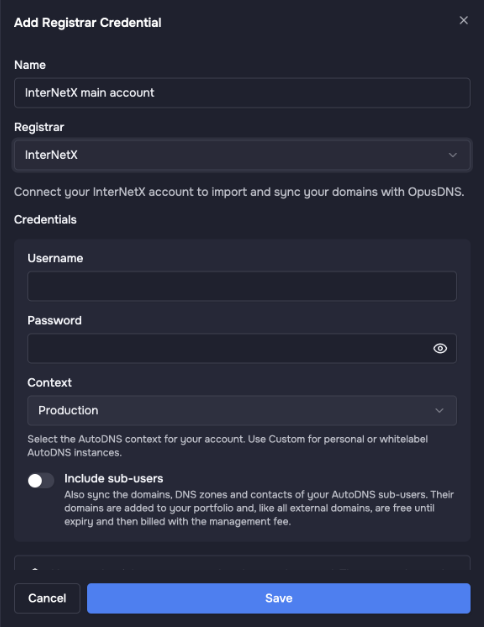
Adding a registrar connection, here for InterNetX (AutoDNS).
Your credentials are stored encrypted and are not shared with third parties. OpusDNS only uses them to create the portfolio report, to manage your external domains and to start transfers via the AI Concierge.
Sync status
- Never synced: the connection exists, no sync has run yet.
- Not activated: the connection is not active yet.
- Syncing: the sync is running.
- Synced: done, with the number of domains found.
- Failed: the registrar rejected the credentials or denied access. Check the credentials and API access at your registrar.
The built-in OpusDNS module at the top gives the AI Concierge access to your own OpusDNS domains. Use Sync there to refresh it.
External domains and costs
Domains found at a connected registrar appear as external domains in your portfolio. External domains are free until they expire and are then billed with the management fee.
What you can do next
- Create a registrar portfolio report to plan your move.
- Import your DNS zones first, then transfer your domains.
- Ask the Concierge, for example "Which domains are still with InterNetX?" or "When do my domains at Moniker expire?"
Delete a connection
Use the delete action in the row of the connection and confirm. This cannot be undone.
More about the AI Concierge
- What Is the AI Concierge and What Can It Do?
- How to Use the AI Concierge
- AI Concierge Skills: Get More Out of the Concierge
- Connect Your Current Registrar
- Registrar Portfolio Report: Plan Your Move to OpusDNS
- Transfer DNS Zones with the AI Concierge
- Import Contacts with the AI Concierge
- Prepare a Domain Transfer with the AI Concierge