
The registrar portfolio report analyzes everything at one of your connected registrars: domains, contacts, DNS zones and records. It shows what could block a transfer and which domains need attention first. The result is a PDF that you can also share with your team.
Where to Find It
Path: Left sidebar → Services → Reports → Create Report
Direct URL: /services/reports
You also find your reports in the AI Concierge under Tools → Registrar Portfolio Reports.
Create the report
- Go to Services → Reports, or in the AI Concierge to Tools → Registrar Portfolio Reports.
- Click Create Report.
- Choose the report type Registrar Portfolio PDF and the connected registrar.
- Click Create. The report is ready after a short time, usually within seconds to a few minutes. Only one report can be generated at a time.
- Click Download. You get a ZIP file with the PDF.
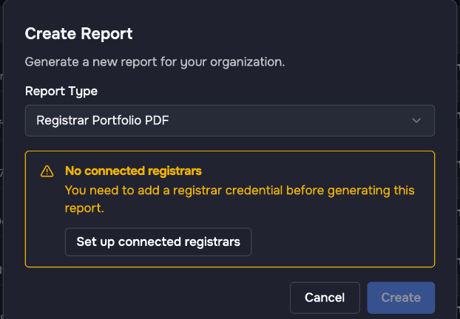
Create Report with the type Registrar Portfolio PDF. Without a connected registrar the dialog points you to the setup.
What the report contains
The figures below are an example.
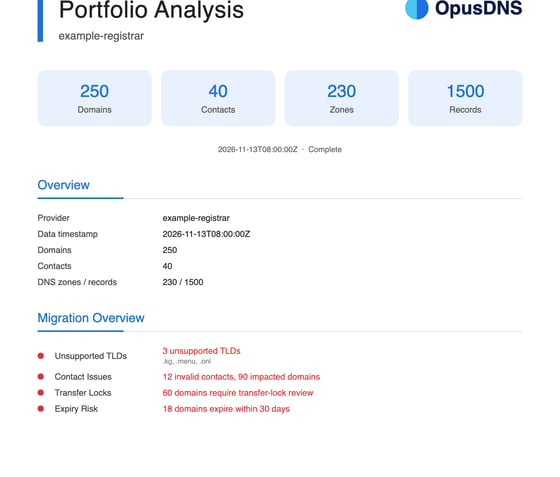
First page of a registrar portfolio report (example data).
Cover page
Registrar, time of the data and the totals, for example 250 domains, 40 contacts, 230 DNS zones and 1,500 records.
Migration overview
The four topics that matter most for a transfer.
- Unsupported TLDs: for example 3 TLDs that OpusDNS cannot take over yet.
- Contact issues: for example 12 invalid contacts that affect 90 domains.
- Transfer locks: for example 60 domains with a transfer lock to review.
- Expiry risk: for example 18 domains that expire within 30 days.
Domain statistics
Domain statuses (for example clientTransferProhibited), the nameservers in use and the TLD distribution with the information whether OpusDNS supports each TLD.
Contact analysis
- how many contacts are valid and invalid
- the fields with errors, for example an empty first name or a placeholder phone number
- the roles affected (owner, admin, tech, zone)
- a list of all invalid contacts and the domains that use them
Zone and DNS analysis
How many domains have a zone, the record types in use (A, TXT, CNAME, MX, SRV, AAAA, NS) and the zones with the most records.
Expiry analysis
Domains grouped by expiry (expired, within 30, 60 and 90 days, within one year, later) and a full list by expiry date with status and contact check.
From report to transfer plan
- Unsupported TLDs: leave these domains at your current registrar for now.
- Expiry risk: renew domains that expire in the next days at your current registrar, or transfer them first.
- Contact issues: fix the invalid contacts, see Import Contacts with the AI Concierge.
- DNS: import the zones and check them with
/zone_audit. - Transfer locks: the transfer wizard unlocks the domains for you when you start the transfer.
- Transfer in batches, starting with the domains that expire soonest: Prepare a Domain Transfer with the AI Concierge.
Ask the Concierge about the same data, for example "Which domains at InterNetX expire in the next 30 days?" or "Which of my InterNetX contacts are invalid?"
More about the AI Concierge
- What Is the AI Concierge and What Can It Do?
- How to Use the AI Concierge
- AI Concierge Skills: Get More Out of the Concierge
- Connect Your Current Registrar
- Registrar Portfolio Report: Plan Your Move to OpusDNS
- Transfer DNS Zones with the AI Concierge
- Import Contacts with the AI Concierge
- Prepare a Domain Transfer with the AI Concierge