
The AI Concierge is the assistant built into the OpusDNS Dashboard. You chat with it in plain language, and it does more than answer: it looks up your real portfolio data, runs checks and prepares changes for you. Every change waits for your approval before anything happens.
Access: the AI Concierge is activated per organization. Open AI Concierge in the left sidebar once, send the access request and confirm the addendum for the AI Concierge service. We activate your organization and you can start right away.
Where to Find It
Path: Left sidebar → AI Concierge
Direct URL: /ai-concierge
On every other page, open it as a side panel with the AI Concierge button at the top right or with Cmd + J on a Mac.
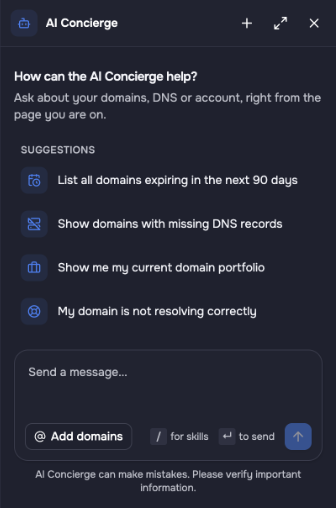
The AI Concierge side panel with suggestions and the chat input. It opens next to the page you are working on.
What you can use it for
- Portfolio questions: "Which domains expire in the next 90 days?", "Show me all my .de domains", "Give me a cost breakdown of my portfolio".
- DNS: create or change records, find domains with missing DNS records, apply the same change to many zones at once.
- Domain management: nameservers, transfer lock, auto-renew, tags, forwards and parking, also for many domains in one go.
- Registration: check availability, get name suggestions and add domains to your cart.
- Moving to OpusDNS: connect your current registrar, import DNS zones and contacts, transfer domains with auth codes fetched for you and create a registrar portfolio report to plan the move.
- Checks with skills: ready-made audits for domains, DNS zones and security, troubleshooting for domains that do not resolve, and help with failed jobs. Type
/in the chat to see them. - Live lookup: registration status, registrar, expiry and public DNS of any domain, also outside your account.
- White-label design: design the look of your dashboard from your logo or website.
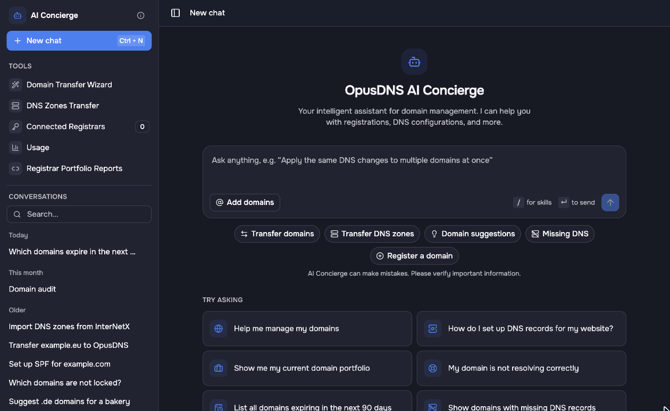
The AI Concierge full page: tools and conversations on the left, chat with quick actions on the right.
How it keeps you in control
- Nothing changes without your approval. When the Concierge wants to change something, it shows an approval card with exactly what will happen. You accept or deny it. Approved changes run as bulk jobs, a batch of changes that you can follow step by step under Bulk Jobs.
- It works with your live data. Answers are based on your current domains, zones and contacts, not on a copy.
- It can make mistakes. Check important information before you approve a change, especially for many domains at once.
- It answers in your language. Write in English, German or another language and it replies in the same language.
More about the AI Concierge
- What Is the AI Concierge and What Can It Do?
- How to Use the AI Concierge
- AI Concierge Skills: Get More Out of the Concierge
- Connect Your Current Registrar
- Registrar Portfolio Report: Plan Your Move to OpusDNS
- Transfer DNS Zones with the AI Concierge
- Import Contacts with the AI Concierge
- Prepare a Domain Transfer with the AI Concierge