
With Auto Top-Up, your prepaid balance is topped up automatically from your credit card as soon as it falls below an amount you choose. This helps you keep enough funds for registrations, renewals and transfers.
Before you start
Auto Top-Up requires a saved credit card. If you have not added a card yet, add one first (see How to Top Up via Credit Card). Without a saved card, the card Auto Top-Up is not shown.
Set up Auto Top-Up
- Go to Billing > Payments in the left sidebar.
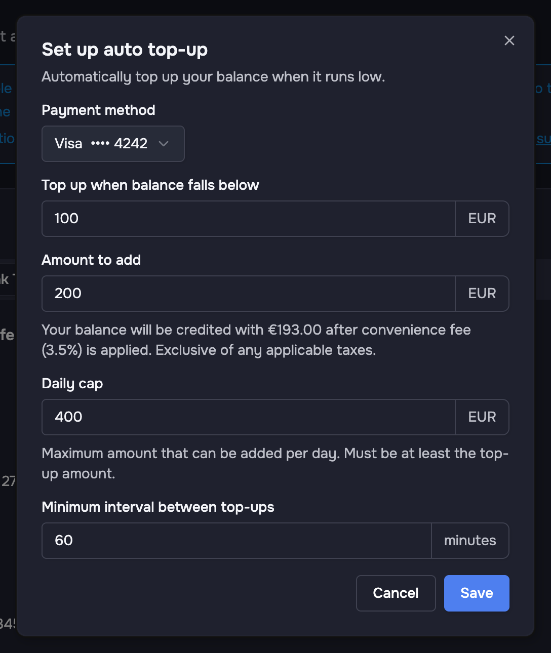
- In the card Auto Top-Up, click Set up auto top-up.
- Choose the Payment method (your credit card).
- Under Top up when balance falls below, enter the threshold.
- Under Amount to add, enter the amount for each top-up.
- Check the fee note below the amount. The convenience fee of 3.5% for credit card top-ups also applies to automatic top-ups. For an amount of €200, for example, the note reads: "Your balance will be credited with €193.00 after convenience fee (3.5%) is applied. Exclusive of any applicable taxes."
- Under Daily cap, enter the maximum amount that can be added per day. It must be at least the top-up amount.
- Check the Minimum interval between top-ups (60 minutes by default).
- Click Save. You see the message "Auto top-up has been set up."
After setup
The card Auto Top-Up shows your settings, for example "When balance < €100.00, add €200.00 (daily cap: €400.00)", the card used and the date of the last top-up. You find the receipt for each top-up under Billing > Receipts.
Change or remove Auto Top-Up
- To change the settings, click Edit auto top-up, adjust the values and click Save.
- To switch Auto Top-Up off, click Remove auto top-up and confirm. Your balance is then no longer topped up automatically.
If a top-up fails
If an automatic top-up fails, the card shows the warning "Last top-up attempt failed" with the reason. After several failed attempts in a row, Auto Top-Up is disabled automatically. Check your card, for example the expiry date, before you use Auto Top-Up again. You can always add funds manually by credit card or bank transfer (see How to Add Funds via Bank Transfer).