
You can add funds to your prepaid balance by bank transfer. Once we have received the money, we credit the amount to your balance as quickly as possible.
Add funds by bank transfer
- Go to Billing > Payments in the left sidebar, or click Add Funds on the card Current balance (for example on Billing > Invoices).
- In the card Transfer Funds, the tab Bank Transfer is selected. It shows the bank details for your currency: Account holder, IBAN, BIC, Reference, Bank and Address.
- Copy the details with the copy icons next to the fields.
- In your banking app, create a transfer to this account and enter the Reference exactly as shown ("Customer number: ..."). Without your customer number, we cannot match the payment to your account quickly.
- Send the transfer. Any fees charged by the bank must be carried by the sender.
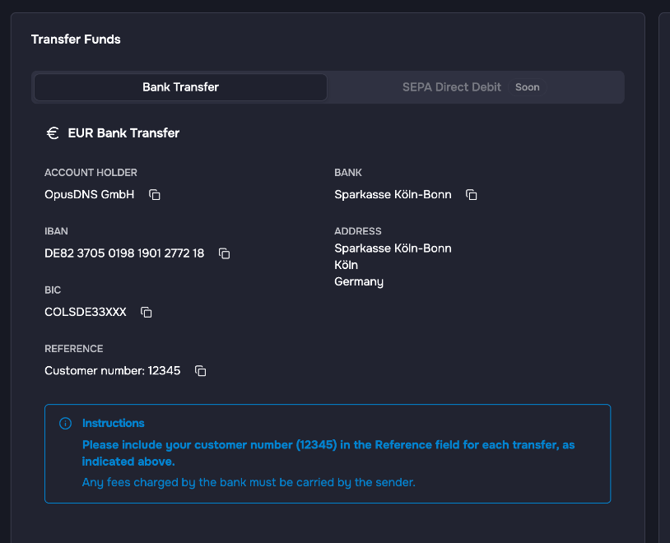
The box Instructions below the bank details repeats these notes. Your customer number is also shown under Settings > Account. If you see "Billing setup in progress" instead of bank details, your bank details are still being prepared. In that case, please contact us through the support center.
Good to know
- The tab SEPA Direct Debit is marked Soon and is not available yet. If you need another payment option, please contact us through the support center.
- For questions about billing or prices, use the link to the support center on Billing > Payments.
- Prefer a credit card? See How to Top Up via Credit Card.