To use the OpusDNS API you need an API key. You create it in the dashboard under Developer > API Credentials.
Create an API key
- Go to Developer > API Credentials and click New API Credential.
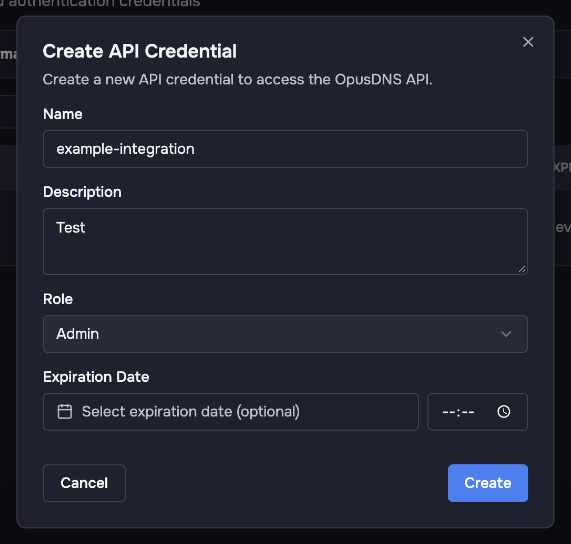
- In the dialog Create API Credential, enter a Name and optionally a Description.
- Choose a Role. The role controls what the key may do. The Admin role gives full access to your account. Choose the narrowest role your integration needs. The role can't be changed later. See Roles and Permissions for Users and API Keys.
- Optionally set an Expiration Date and create the credential.
- You now see the API key, the client ID and the client secret. Click Copy All Credentials and store them securely. They are shown only once and can't be displayed again.
Use the key
Send the API key in the X-Api-Key header with every request. The API key starts with opk_. Don't confuse it with the client ID, which starts with organization_.
curl https://api.opusdns.com/v1/domains --header "X-Api-Key: YOUR_API_KEY"You only need the client ID and client secret if you request OAuth tokens instead (POST /v1/auth/token). Details are in the Authentication guide and the API Quickstart. Overview of the documentation: Where can I find the OpusDNS API reference / documentation?
Before your first registration or transfer
Registrations and transfers are normally paid from your prepaid balance. Top up your balance under Billing > Payments with Top-up before your first registration or transfer. See Understanding the Pre-Payment Balance Model. If you need other payment options, for example SEPA (coming soon), contact us.
Keep your keys secure
- A key with the Admin role can manage your whole account. Never share it publicly and never commit it to a code repository.
- Optionally limit API access to the IP addresses of your servers under Developer > API Security. See Restricting API Access by IP.
- If a key may have been exposed, delete it under Developer > API Credentials and create a new one.
More details: Creating API Credentials. To test without risk first: How do I generate an API key for the sandbox?