Configuring Default Domain Settings
Set default behaviors for newly registered domains so you don't have to configure them every time.
Where to Find It
Path: Left sidebar → Settings → Preferences → Domain Default Settings card
Direct URL: /settings/preferences
What You'll See
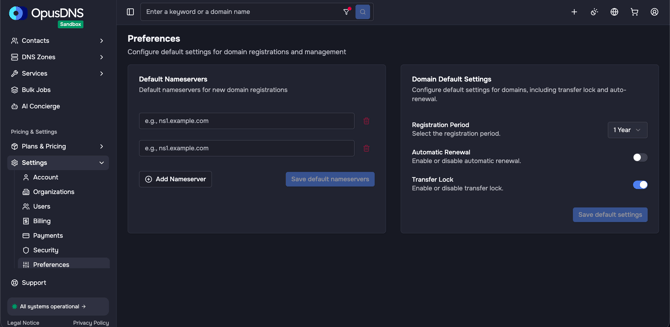
A card titled "Domain Default Settings" with the description "Configure default settings for domains, including transfer lock and auto-renewal." It contains toggle or selection controls for:
- Default Registration period — Select the default registration period for new registrations. It will be prefilled during checkout.
- Default auto-renewal — Whether new domains should auto-renew by default
- Default transfer lock — Whether new domains should be locked by default
A "Save default settings" button at the bottom (shows "Saving default settings" while processing).
Please note that the available registration period depends on the selected domain extension. Not all TLDs support up to 10 years; for example, domains such as .de are only available with monthly or yearly registration periods. In such cases, this setting does not apply.
The same applies to the transfer lock setting, which may not be available for all domain extensions.
Always review your checkout summary to confirm the available options for your selected domain.
Step-by-Step
- Navigate to Settings → Preferences.
- Find the Domain Default Settings card.
- Configure your preferred defaults:
- Choose default registration period
- Enable/disable default auto-renewal
- Enable/disable default transfer lock
- Click "Save default settings".
Success/Error Messages
- ✅ "Domain default settings saved successfully."
- ❌ "Failed to save default domain settings."
- ❌ "Failed to load default domain settings." (on page load)
Important Notes
- These settings apply to future domain registrations only.
- Existing domains are not retroactively changed.
- You can always override these defaults during the checkout process.