
The transfer lock (also called registrar lock or domain lock) prevents your domain from being transferred to another registrar. As long as the lock is on, a transfer fails even if someone has the auth code. This protects you against domain theft and unwanted transfers.
Where to find it
Go to Domains > All Domains, open the domain and select Domain Settings > Transfer Lock. The Domain Settings card on the Overview tab and the summary line at the top of the page show the status too.
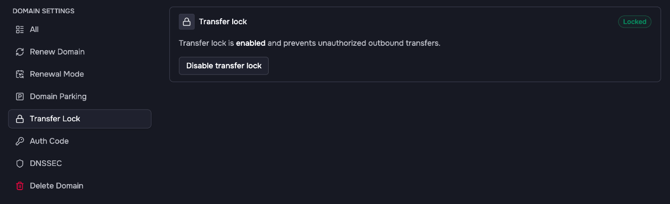
Possible states:
- Locked: the domain can't be transferred.
- Unlocked: the domain can be transferred by anyone who has the auth code.
- Unsupported: the TLD does not support a transfer lock.
- Locked until [date]: after a registrant change, the domain can't be transferred to another registrar until this date. See Changing Domain Contacts.
Enable the transfer lock
- Click Enable transfer lock.
- The dialog Enable transfer lock for example.com appears.
- Click Enable transfer lock to confirm. The message Transfer lock is enabled appears.
Disable the transfer lock
- Click Disable transfer lock.
- The dialog Disable transfer lock for example.com explains that anyone with the auth code can then start a transfer.
- Click Disable transfer lock to confirm. The message Transfer lock is disabled appears.
When to disable it
Disable the transfer lock only when you move the domain to another registrar. You also need the auth code for that, see Where to Find Your Auth Code. If the transfer is canceled or fails, enable the transfer lock again.
Several domains and new domains
To change the lock for several domains, select them under Domains > All Domains, click Update and choose Change transfer lock. Whether new domains are locked by default is set under Settings > Preferences > Domains, see Setting Default Transfer Lock for New Registrations.