Premium domains are high-value domain names that are classified as premium by a registry or previous owner. These are often short, generic, memorable, or highly requested domain names. Because of their value, premium domains usually have different pricing and renewal conditions compared to regular domains.
What are Premium Domains?
A premium domain is a domain name that has been assigned a premium price by the respective registry. This commonly applies to:
- short domain names
- generic keywords
- highly demanded names
- memorable or brandable domains
Examples may include single-word domains, industry keywords, or very short domain names.
The registration process itself is generally identical to registering a regular domain, although pricing may differ significantly.
Registering Premium Domains
Premium domains can be searched and registered directly through the domain registration interface.
Registration in the Dashboard
Navigate to:
- Domains > Register Domain
- or directly via the path:
/domains/register
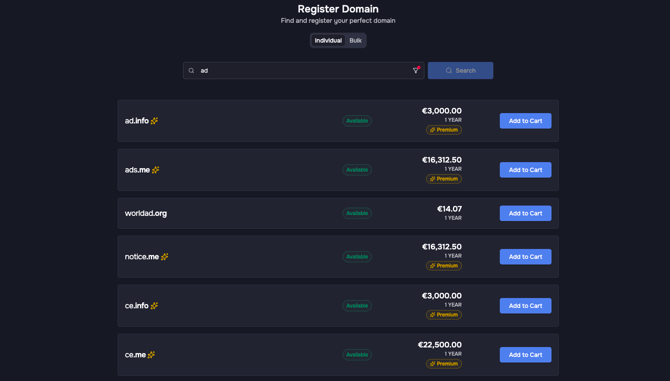
Premium domains are automatically displayed within the search results. They are marked with a premium tag near the pricing, along with a dedicated icon next to the domain name.
Hiding Premium Domains in the search results
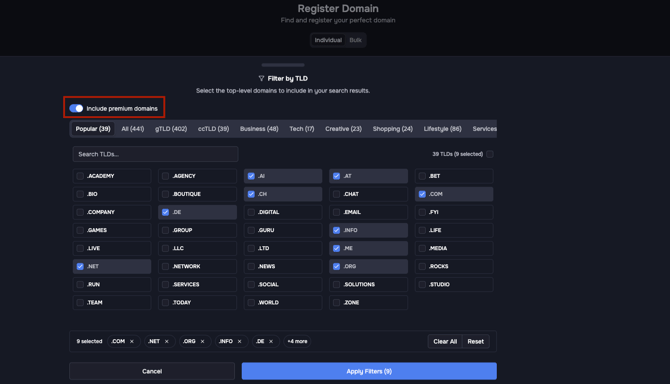
If you do not want premium domains to appear in the search results, you can disable them using the filter inside the search bar.
Registration Process of Premium Domains
The registration process itself works exactly like a normal domain registration and does not require any additional steps.
Transferring Premium Domains
Existing premium domains can also be transferred into your portfolio.
Transfer in the Dashboard
Navigate to:
- Domains > Transfer Domain
- or directly via the path:
/domains/transfer
Required Import Format
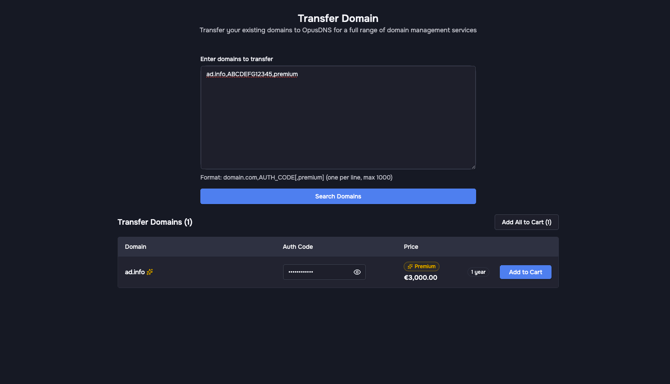
When transferring a premium domain, you must append the keyword premium after the auth code.
Format:
domain.com,AUTH_CODE,premium
ad.info,ABCDEFG12345,premium
The transfer process itself is otherwise identical to a standard domain transfer.
Managing Premium Domains
Existing premium domains can be managed like any other domain within the dashboard.
Domain Management
Navigate to:
- Domains > All Domains
- or directly via the path:
/domains
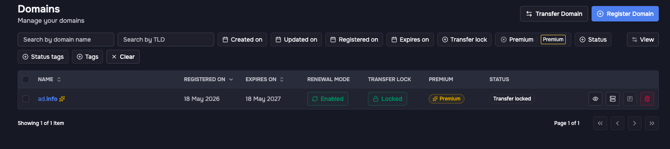
Premium domains are marked with a star icon next to the domain name for easier identification. You can filter them using the Premium filter by clicking the plus icon above the domains table.
Displaying the Premium Column
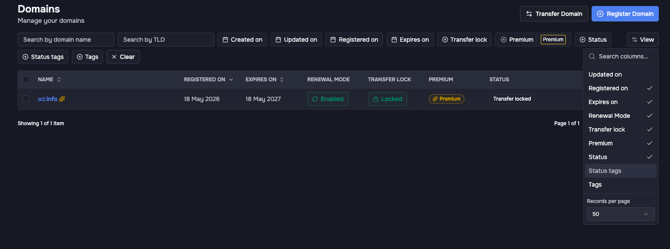
Under View, you can enable and disable the Premium column.
Renewal Pricing for Premium Domains
Renewal pricing for premium domains depends entirely on the registry and the respective TLD.
Different Registry Pricing Models
Registries use different pricing structures for premium domains.
High Initial Registration Price Only
Some registries charge a high one-time premium registration fee, while renewals are billed at normal or significantly lower standard renewal prices afterward.
Permanent Premium Renewal Pricing
Other registries apply premium pricing not only to the initial registration but also to all future renewals. In these cases, the higher premium renewal cost remains permanently active.
The applicable pricing model depends entirely on the specific TLD and registry policies.
Special Case: Legacy Domains
Some domains were originally registered before premium pricing was introduced by the registry.
In such cases:
- the domain may continue to renew at the original standard renewal price
- this pricing usually remains active as long as ownership does not change
Once the domain ownership changes, the domain may then be converted into a regular premium domain and become subject to the current premium pricing model of the registry.