In the OpusDNS dashboard, you can access reports via Services > Reports. These reports provide a comprehensive overview of your DNS configuration and domain management.
All reports are generated automatically on a daily basis and can be conveniently downloaded as CSV files.
You can also create a new report manually by clicking on 'Create Report'.
Click 'Download' at the end of the corresponding entry of your report table to export the selected report.
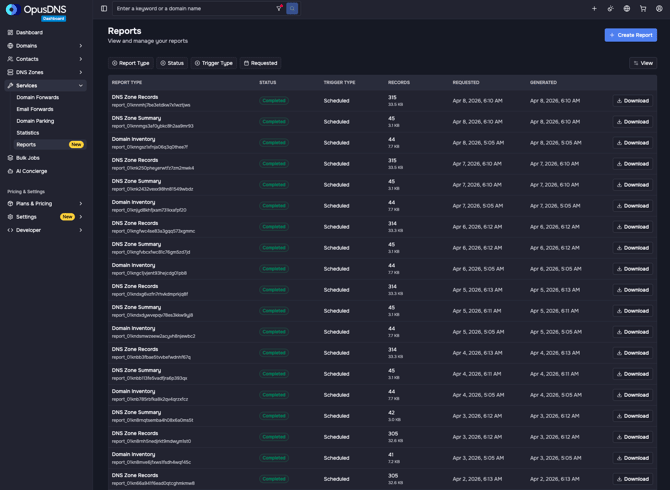
The following report types are available:
1. DNS Zone Records Report
This report contains a complete list of all DNS records within your zones.
What information is included?
| Field | Description |
|---|---|
| zone_name | The DNS zone (domain) the record belongs to |
| rrset_name | The full record name (e.g., subdomain) |
| rrset_type | The record type (e.g., A, MX, TXT, NS, SOA, DNSKEY, DS) |
| ttl | “Time to Live” – how long the record is cached (in seconds) |
| rdata | The actual value of the record |
Example
| zone_name | rrset_name | rrset_type | ttl | rdata |
| example.com. | _verify.example.com. | TXT | 3600 | "verification=abc123" |
| example.com. | www.example.com. | A | 3600 | 192.0.2.1 |
| example.com. | example.com. | MX | 3600 | 10 mail.example.com. |
| example.com. | example.com. | NS | 3600 | ns1.provider.net. |
| example.com. | example.com. | TXT | 3600 | "v=spf1 include:_spf.example.com ~all" |
| example.com. | example.com. | SO | 3600 | ns1.provider.net. hostmaster.example.com. 2026010101 10800 3600 604800 300 |
| domain.net | ... | ... | ... | ... |
| ... |
This report is particularly useful for:
- Troubleshooting DNS issues
- Documenting your DNS configuration
- Security audits and compliance checks
2. DNS Zone Overview Report
This report provides a compact overview of all DNS zones.
What information is included?
| Field | Description |
|---|---|
| zone_name | Name of the DNS zone |
| record_count | Number of DNS records in the zone |
| created_on | Date and time when the zone was created |
| updated_on | Date and time of the last update |
Example
| zone_name | record_count | created_on | updated_on |
| example.com. | 12 | 2025-01-10T10:00:00 | 2026-01-15T22:00:00 |
| example.net. | 8 | 2025-03-05T14:30:00 | 2026-01-15T21:45:00 |
| example.org. | 5 | 2025-06-20T09:15:00 | 2026-01-15T21:30:00 |
| example.info | ... | ... | ... |
| ... |
This report is useful for:
- Getting a quick overview of your DNS zones
- Monitoring changes over time
- Managing multiple domains efficiently
3. Domain Inventory Report
This report lists all your domains along with registration details and status information.
What information is included?
| Field | Description |
|---|---|
| domain_name | Full domain name |
| tld | Top-level domain (e.g., .com, .de) |
| registered_on | Registration date |
| expires_on | Expiration date |
| renewal_mode | Renewal setting (e.g., renew, expire) |
| transfer_lock | Indicates whether transfer lock is enabled (TRUE/FALSE) |
| statuses | Domain status codes |
| nameservers | Assigned nameservers |
| registrant_email | Email address of the domain registrant |
| registrant_org | Organization of the registrant |
Example
| domain_name | tld | registered_on | expires_on | renewal_mode | transfer_lock | statuses | nameservers | registrant_email | registrant_org |
| example.com | com | 2024-01-01T10:00:00 | 2027-01-01T10:00:00 | renew | TRUE |
clientTransferProhibited|transferPeriod |
ns1.provider.net|ns2.provider.net | admin@example.com | Example Ltd. |
| example.de | de | 2025-03-12T09:30:00 | 2025-04-12T09:30:00 |
expire |
FALSE |
connect|deleted|ok |
ns1.provider.net|ns2.provider.net | info@example.de | Example GmbH |
| example.net | ... | ... | ... |
... |
... |
... |
... | ... | ... |
| ... |
|
|
This report is particularly useful for:
- Managing your domain portfolio
- Monitoring expiration dates
- Supporting compliance and documentation requirements