You only need the client secret if you request OAuth tokens (POST /v1/auth/token). If you send your API key in the X-Api-Key header, a lost client secret does not affect you and there is nothing to do.
The API key and the client secret are shown only once, when you create the credential. They can't be displayed again. If you need the secret, or if you lost the API key itself, replace the credential. Create the new credential first and delete the old one only when your integration works with the new values. That way there is no interruption.
1. Create a new credential
- Go to Developer > API Credentials and click New API Credential.
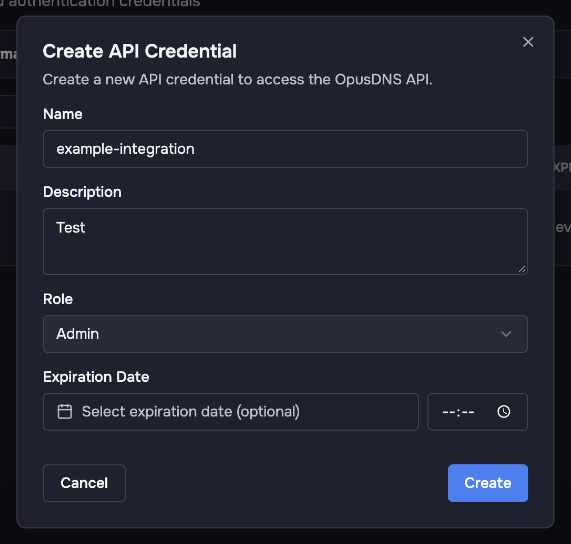
- In the dialog Create API Credential, enter a Name and optionally a Description.
- Choose the Role your integration needs, usually the same as for the old credential. The role can't be changed later. See Roles and Permissions for Users and API Keys.
- Optionally set an Expiration Date and create the credential.
- Click Copy All Credentials and store the API key, client ID and client secret in a safe place.
2. Update your integration
Replace the old values in your code, configuration or secret store and send a test request.
3. Delete the old credential
- In Developer > API Credentials, choose Delete for the old credential.
- In the dialog Delete API Credential, choose one option and confirm:
- Revoke: the credential stops working immediately and stays in your list with the status Revoked.
- Purge: the credential stops working immediately and is permanently deleted.
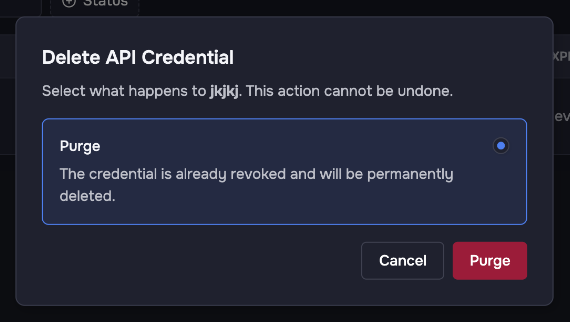
This action can't be undone. More details: Creating API Credentials.