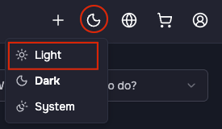
In your OpusDNS Dashboard, you can switch between Light, Dark, and System appearance settings. Click the theme icon in the top-right icon bar and select “Light” as your theme.
.png?width=670&height=24&name=Dark%20Mode%20(ENG).png)

In your OpusDNS Dashboard, you can switch between Light, Dark, and System appearance settings. Click the theme icon in the top-right icon bar and select “Light” as your theme.