
Deleting a single Contact
Where to find it?
Path: Left sidebar → Contacts → click on a contact
Direct URL: /contacts/[CONTACT_ID]
How to delete a single Contact
If you want to delete a single contact profile, follow these steps:
- In the Contacts list, click the name of the contact you want to delete.
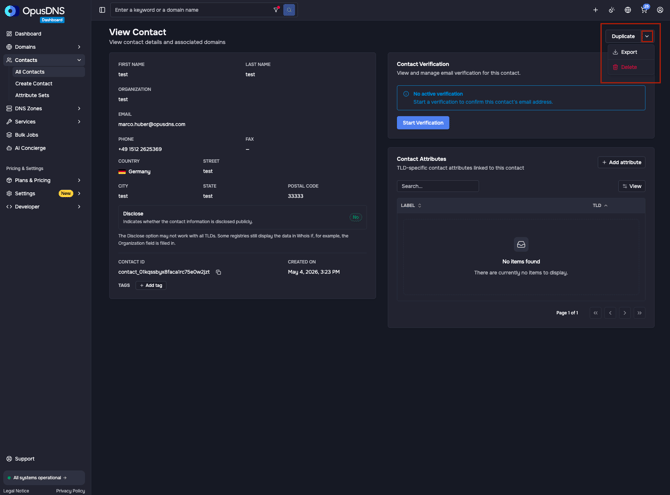
- Inside the contact profile, select the arrow-down icon next to “Duplicate Contact” in the top-right corner.
- A small menu opens up. Click “Delete” and confirm by clicking “Delete” again.
Deleting multiple / all Contacts
Where to find it?
Path: Left sidebar → Contacts
Direct URL: /contacts
How to delete multiple / all Contacts
If you want to delete multiple contacts, follow these steps:
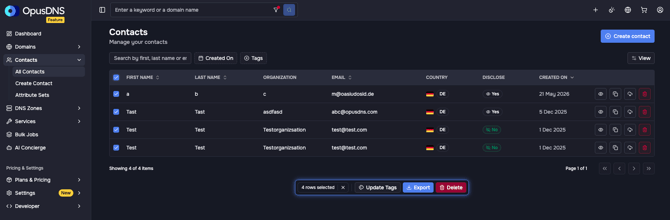
- In the Contacts list, use the selection checkbox at the beginning of the contact row, or select all contacts using the checkbox in the table header.
- Once at least one contact is selected, an action bar will appear.
- Click “Delete” in the action bar and confirm by clicking “Delete” again.
.jpg?width=670&height=174&name=Knowledge%20Base%20Banner_%205%20Dark%20(1).jpg)