Managing Your Account and Organization Profile
Where to Find It
Path: Left sidebar → Settings → Account
Direct URL: /settings/account
What You'll See
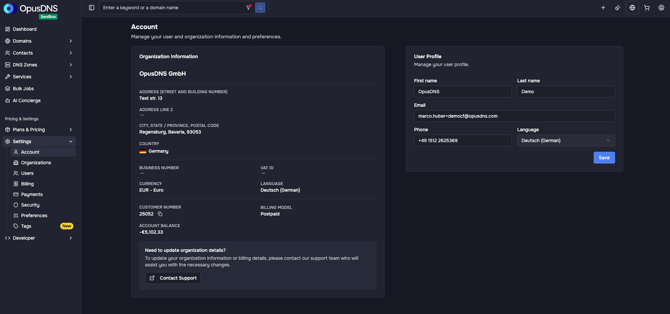
The Account page has two main cards:
Organization Information Card:
- Title: "Organization Information"
- Description: "Manage your organization information."
- Displays your organization's name, address, and other details
- Quick links: "View Billing" and "Upgrade Plan"
- Important note: A notice reads "To update your organization information or billing details, please contact our support team who will assist you with the necessary changes." with a "Contact Support" button.
- For reseller accounts: "To update your organization information, please contact your account manager or reseller who will assist you with the necessary changes."
User Profile Card:
- Title: "User Profile"
- Description: "Manage your user profile."
- Displays and allows editing of your personal details (name, email, etc.)
Updating Organization Details
Organization information cannot be self-edited in the dashboard. To make changes:
- Click "Contact Support" on the Organization Information card, or
- Navigate to the Support page and create a ticket