
With vanity nameservers, your DNS zones are served by the OpusDNS infrastructure under nameserver names of your own domain, for example ns1.example.com and ns2.example.com instead of ns1.opusdns.com and ns2.opusdns.net. The NS and SOA records of the zones then show your names.
Before you start
- Parent domain: the domain under which the nameserver hostnames live, for example
example.com. - A and AAAA records: each nameserver hostname needs A (and AAAA) records that point to the addresses OpusDNS assigns to your set. After you create the set, its diagnostics tell you whether these records are missing.
- Glue records: because the hostnames lie inside the parent domain, glue records (host objects) at the registry are recommended. They are not required: the set only needs its nameserver hostnames to resolve. The diagnostics of the set show whether the glue is registered and visible, and the hint below each check says what to do. Background: Setting Up Glue Records (Host Objects).
- Cost: a vanity nameserver set is charged per set and year. The page shows a price notice before you create the set, and you confirm the yearly charge there.
Create a vanity nameserver set
Go to DNS Zones > Vanity Nameservers. The list shows Name, Parent Domain, Nameservers and Status of your sets.
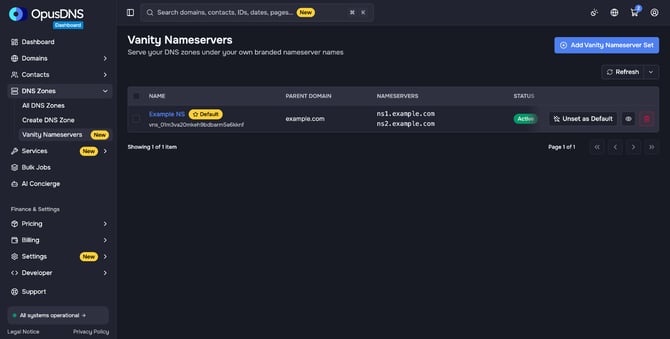
- Click Add Vanity Nameserver Set.
- Enter a Name for your own reference.
- Enter the Parent Domain, for example
example.com. - Enter the SOA Contact Email. It is published as the responsible contact in the SOA record of the zones that use the set.
- Under Nameserver Hostnames, enter at least two names, for example
ns1andns2. The parent domain is added automatically, so they becomens1.example.comandns2.example.com. Click Add nameserver for more. - Read the price notice and tick the checkbox to accept the yearly charge.
- Click Create.
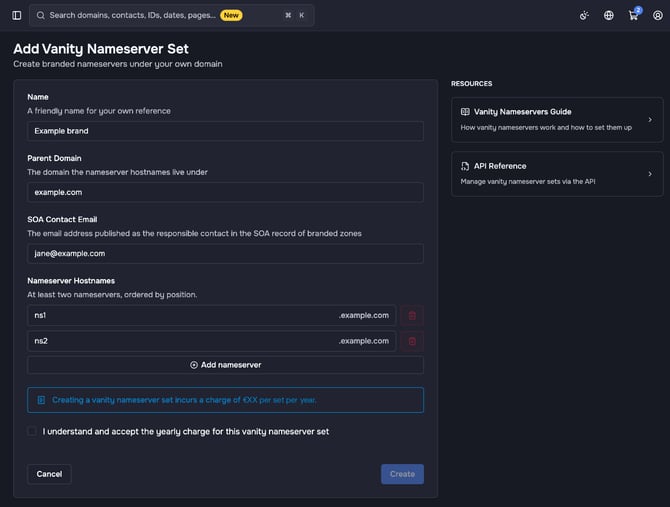
The activation runs in the background. The status of the set changes from Provisioning to Active when it is ready. Other statuses are Suspended, Failed and Deleting.
Check the setup with diagnostics
Open the set and click Run Diagnostics under Diagnostics. The check only reads and changes nothing. A summary at the top shows the overall result, for example Propagating when the setup looks correct and DNS changes are still spreading. Below it, three checks follow, each marked Required or Recommended:
- Nameserver A/AAAA records: whether all hostnames resolve to the assigned addresses. If not, publish A (and AAAA) records for each nameserver hostname in the zone of the parent domain, as the hint below the check describes. The details below the check show what the check found, including the required addresses.
- Glue visible in parent zone: whether the parent zone (for example
.com) already publishes the glue records. - Glue registered at registry: whether every nameserver is registered as a host object at the registry.
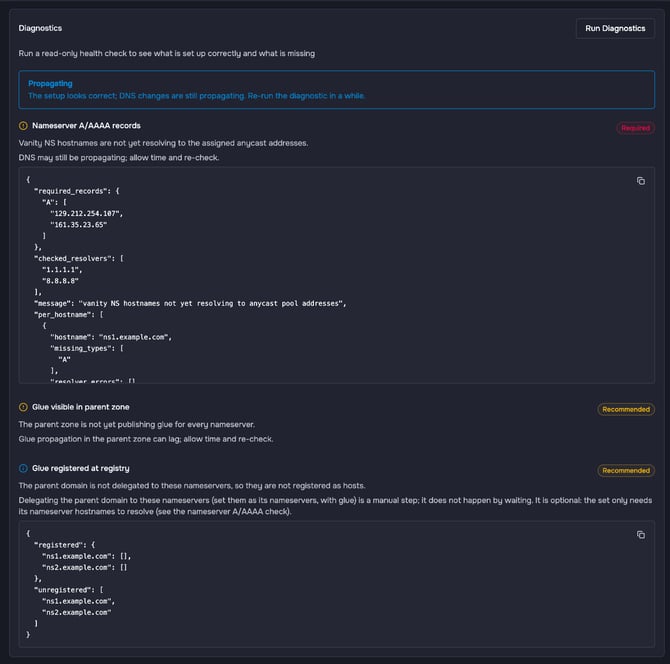
DNS changes and glue records can take some time to become visible. If the diagnostics show Propagating or a check shows a warning, wait a while and run the diagnostics again. The hint below each check says whether waiting is enough or whether a step on your side is needed.
Use the set
- Default for new zones: click Set as Default. New zones then use this set. Unset as Default switches new zones back to the OpusDNS nameservers.
- New zone: choose the set under Vanity Nameservers when you create the zone.
- Existing zone: open the zone, go to Settings > Nameservers, choose the set in the card Vanity Nameservers and click Apply. The card appears when your organization has an active vanity nameserver set.
- Domain: open the domain, go to Nameservers > Nameservers and choose the set under Vanity nameserver sets. Then click Save nameservers.
The detail page of a set lists under Zones how many zones use it. Click View Zones to see them.
Delete a set
You can only delete a set that no zone uses and that is not the default. Move its zones to another set or back to the OpusDNS nameservers first. Glue records registered at the registry are not removed automatically; if the parent domain is in your OpusDNS account, delete them under Nameservers > Hosts of that domain when you no longer need them.
For the API, see the Vanity Nameservers Guide and the API Reference linked on the page Add Vanity Nameserver Set.